
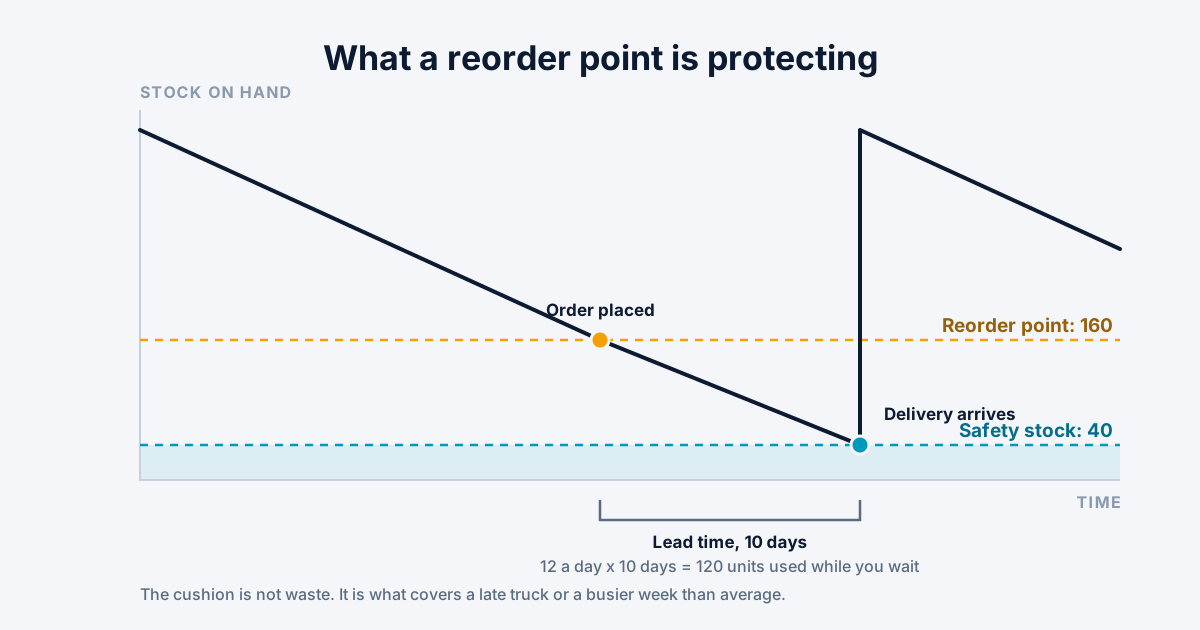
A reorder point is the stock level at which you place another order. Hit it, and you buy more. The whole idea is to trigger the purchase early enough that the new stock lands before the old stock runs out.
That is the entire concept. The interesting part is picking the number, and then the part almost nobody talks about, which is making sure something actually tells you when you cross it.
The formula
Two things decide it. How fast you sell the item, and how long a replacement takes to arrive.
reorder point = (average daily usage × lead time in days) + safety stock
Say you sell 12 a day and your supplier takes 10 days. You will get through 120 units while you wait, so 120 is your lead time demand. If you reorder at 120 you will run out on the exact day the truck arrives, which is a plan with no room in it. Add safety stock, say 40, and your reorder point is 160.
At 160 units you place the order. Ten days later you are down to about 40 and the delivery lands.
The numbers you plug in are the hard part
The formula is arithmetic. Getting honest inputs is the actual work.
Lead time is not what the supplier says
It is what they have actually done, measured from when you sent the order to when the stock was on your shelf and countable. That includes the two days the purchase order sat unapproved, the weekend the shipment spent in a depot, and the afternoon it waited on your own receiving dock.
Businesses routinely use the vendor's quoted lead time and then wonder why they stock out. Use your own receiving history instead.
Average daily usage hides its own trap
An average across a year is useless for anything seasonal. If you sell four times as much in November, a reorder point built on the annual average will stock you out every November and leave you overstocked every February.
Use a window that matches how the item actually behaves, and recalculate more often for the volatile ones.
Safety stock, briefly
Safety stock is the cushion for the two things the formula assumes away: demand being higher than average, and the supplier being later than usual.
Setting it well is its own subject with real math behind it. As a starting point, a week of average usage on your important items is a reasonable placeholder, and you can tighten it once you have enough receiving history to see how bad your worst case actually is.
Do not set it to zero to save money. Zero safety stock means half your deliveries arrive after you have already run out, because average lead time means late half the time.
Min/max is the same idea with the top end included
You will see min/max used alongside reorder points, and it causes confusion because they overlap.
The min is the reorder point. The max is how high you refill to. Reorder point tells you when to buy; max tells you how much. If your reorder point is 160 and your max is 400, crossing 160 triggers an order for 240.
Reorder point on its own leaves the order quantity to whoever is placing it, which is fine when that person knows the item and bad when they do not.
The part that actually breaks
Here is what most articles about reorder points leave out, and it is the reason people go looking in the first place.
A reorder point that nothing watches is just a number in a field.
Plenty of systems let you store one. Far fewer will interrupt you when stock crosses it. So the number sits in the item record, technically correct, while the actual trigger for reordering remains someone noticing a shelf looks empty. That is not a reorder point, it is a note about one.
If you have found yourself searching for how to get reorder point notifications out of whatever you currently run, that is the gap you are hitting, and it is a common one. The number is configured. Nothing is watching it.
What working looks like: crossing the threshold produces something that reaches a person who can act. A queue they check, a digest that arrives on the mornings they place orders, an alert. Not a report someone has to remember to run, because the whole point was to stop relying on somebody remembering.
Why a reorder point notification does not fire
If a reorder point is set and you still never hear about it, the cause is usually on a short list. These are worth checking in roughly this order, whatever system you run.
1. Nothing checks it on a schedule. Many systems compare stock against reorder points only when a planning run, a report or a background job is started. If that job was never scheduled, or quietly stopped after an upgrade, the number is set and nothing reads it.
2. The point and the stock are measured at different levels. A reorder point set for the whole company and compared against one warehouse's stock, or the other way round, can sit out of range permanently.
3. On-hand includes stock you cannot use. If stock that is reserved for orders, in transit, damaged or on hold counts as on hand, the level never looks low, even when the shelf is empty.
4. The units do not match. A reorder point of 10 entered in cases, compared against stock counted in single units, will not trigger until you are nearly out.
5. An open order already covers it. Plenty of systems stay quiet once a purchase order is on the way. That is usually correct, and it is also how an old purchase order nobody will ever receive can silence an item for months.
6. The alert goes somewhere nobody reads. A former employee, a shared inbox, an email filter. Check where the notification is actually delivered before assuming it is not being sent.
7. The minimum is blank or zero. A reorder point of zero fires only when you have nothing left, which is the moment it stops being useful.
The first one is the most common. The fix is rarely a better formula. It is making sure something runs every day and lands in front of the person who buys.
When to recalculate
Reorder points go stale quietly. A supplier who used to take ten days now takes eighteen, and nothing in your system notices, because the number was set once during implementation.
Worth revisiting when a supplier changes, when lead times visibly drift, going into and out of a season, and after any stockout. A stockout is the most useful signal you get: either the reorder point was too low or nothing told you when you hit it, and it is worth knowing which.
In Knowledge ERP
Reorder points are set on a product or on a whole category, and every reorder point names a location, which matters because a van and a warehouse do not need the same minimum. Only stock at that location counts toward it.
Stock below a minimum is flagged in the product list and shows up in the reorder queue and the low stock report, rather than a number changing silently. There is also an opt-in reorder digest you can have delivered on the days and at the hour you actually place orders.
Suggested order quantities come from two methods shown side by side, one built from your real usage and the vendor's lead time and one from a demand forecast, so you can sanity-check one against the other rather than trusting a single calculation. Each suggestion shows the usage and lead time it assumed.
Because stock is tracked as individual units, the usage history behind the calculation is real movement rather than an inferred number. If your counts are not trustworthy yet, cycle counting is the thing to fix first, because a reorder point calculated from a wrong on-hand number fires at the wrong time.
Stop finding out at the shelf
Reorder points per location, a suggestion queue and a digest that arrives on the mornings you actually place orders. The 30-day trial runs on your real data.