
A spreadsheet is a real inventory system. It is free, everyone can already use one, it does exactly what you tell it, and for a business with a few hundred items and one person touching them it is often the right answer. Getting talked out of it too early is its own kind of expensive.
So this is not an argument that you should stop. It is a list of the specific points where a spreadsheet stops working, so you can tell the difference between this is annoying and this is costing money.
What a good inventory spreadsheet has in it
If you are building one, or fixing one, these are the columns that earn their place.
| Column | Why |
|---|---|
| SKU | A short unique code you assign. Not the supplier's part number, which changes without telling you |
| Description | What it is, in the words your staff actually use |
| Location | Shelf, bin, van or site. One field, filled in every time |
| Quantity on hand | The count |
| Reorder point | The level at which you order more |
| Reorder quantity | How much you order when you hit it |
| Unit cost | What you pay |
| Supplier | Who you buy it from |
| Lead time (days) | How long they take |
| Last counted | The date. Usually left out, and the most useful column on the sheet |
Two rules matter more than the columns. Keep the data on one sheet, one row per item, and build any pretty summaries somewhere else. And never let two versions exist, which in practice means one file in Google Sheets or on a shared drive, not a file emailed around.
If that sheet is working for you, keep it.
The five things that break it
Two people editing at once
This is not a technical problem, it is a truth problem. The moment more than one person can change a count, the sheet stops being a record of stock and becomes a record of who saved last. Google Sheets solves the concurrency and cannot solve the logic: two people can both see 12, both sell 8, and both be certain they were right.
You need to know which one
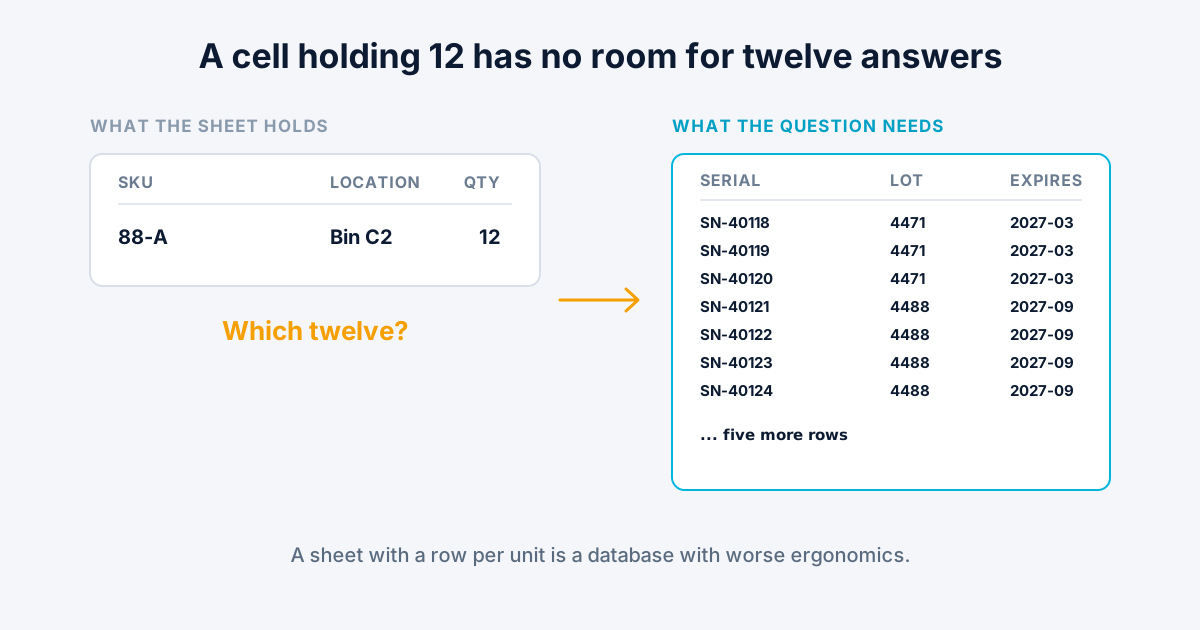
A spreadsheet counts quantities. It cannot easily tell you which specific item went to which customer, because a cell holding 12 has no room for twelve serial numbers, twelve lots and twelve expiry dates. The workaround is a row per unit, and a sheet with a row per unit is a database with worse ergonomics. This is the point where warranties, recalls and equipment loans all turn into guesswork at the same time.
Stock lives in more than one place
One location is a column. Two is a column per location, which mostly holds. Five, plus vans, plus a bin structure inside the warehouse, plus movement between them, and you are maintaining a matrix by hand. The transfers are the part that fails, because a transfer is two edits that both have to happen and one of them is easy to forget.
Somebody asks what happened
A spreadsheet holds the current value, not the history. When a count is wrong there is no record of the twenty changes that produced it or who made them. Version history helps a little and was not built for the question of when this item's count changed, and why.
The count is never quite true
This is the quiet one. Every other problem announces itself as an argument. This one just sits there: the sheet says 12, the shelf has 9, and nobody finds out until an order cannot be filled. A spreadsheet has no way to force a count, flag stale data, or tell you which items have not been verified since March. That is the gap cycle counting exists to close.
The honest threshold
You have outgrown it when more than one person needs to change stock levels, or when you need to answer questions about individual items rather than quantities.
Everything else is preference. Those two are not, because they are things a spreadsheet structurally cannot do, and no amount of formula work fixes either one.
What moving actually involves
Less than people expect. Fear of the migration is why a lot of businesses stay on a broken sheet for an extra year.
Knowledge ERP imports products from CSV, so the sheet you already have is the starting point rather than something to retype. What changes is the model. Instead of a product with a quantity, you get products and the individual units underneath them, each with its own barcode and optionally a serial number, a lot and an expiry date. That is the change that makes the middle three problems above stop existing.
Import the sheet and label one shelf
A month on the trial with your real data will tell you whether the count starts meaning something, which is the only test worth running.